Prepare the folder
Keep the app payload, install script, uninstall script, detection rule, and icon together.
Intune Win32 apps, without the maze
Win32Forge takes an app folder, packaging scripts, and an icon, then turns them into a ready-to-upload .intunewin package with the Intune metadata wired in.
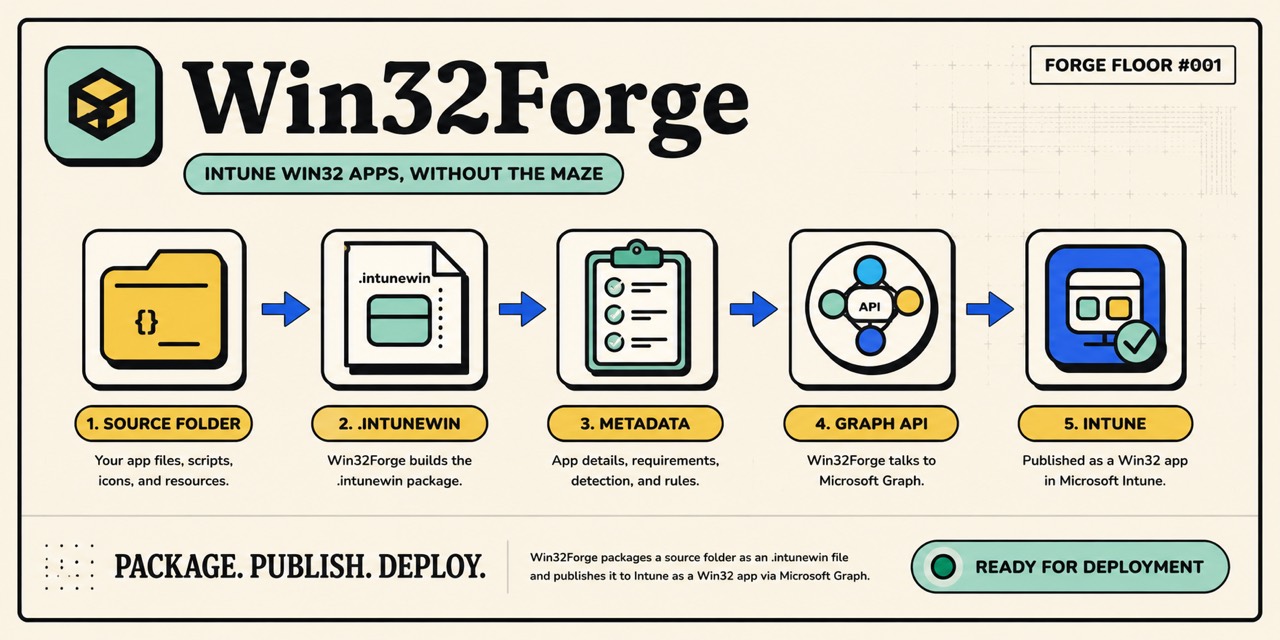
Plain-language overview
It handles the repeatable packaging and Microsoft Graph upload work between your source folder and Intune.
Keep the app payload, install script, uninstall script, detection rule, and icon together.
Win32Forge builds the `.intunewin` package Intune expects.
It adds the app name, publisher, version, install command, uninstall command, and detection rule.
It uploads the package through Microsoft Graph so the app shows up as a Win32 app.
Before publishing
You need PowerShell 7, two helper modules, an Intune tenant, and permission to create Win32 apps.
Install-Module Win32Forge -Scope CurrentUser
Import-Module Win32ForgeInstall-Module Microsoft.Graph.Authentication, SvRooij.ContentPrep.Cmdlet -Scope CurrentUserPublish an app
Use `-WhatIf` for a dry run. Use `-Force` when replacing an existing app with the same display name.
Publish-IntuneWin32App `
    -SourceDirectory ./Examples/ContosoSampleApp `
    -Name 'Contoso Sample App' `
    -Publisher 'Contoso' `
-Version '1.0.0'Publish-IntuneWin32App `
-SourceDirectory ./Examples/ContosoSampleApp `
-Name 'Contoso Sample App' `
-Publisher 'Contoso' `
-Version '1.0.0' `
-WhatIfPublish-IntuneWin32App `
-SourceDirectory ./Examples/ContosoSampleApp `
-Name 'Contoso Sample App' `
-Publisher 'Contoso' `
-Version '1.0.0' `
-DetectionRule @{
Type = 'ProductCode'
ProductCode = '{11111111-1111-1111-1111-111111111111}'
}Publish-IntuneWin32App `
-SourceDirectory ./Examples/ContosoSampleApp `
-Name 'Contoso Sample App' `
-Publisher 'Contoso' `
-Version '1.0.0' `
-DetectionRule @{
Type = 'PowerShellScript'
ScriptPath = 'detection.ps1'
EnforceSignatureCheck = $false
RunAs32Bit = $false
}Publish-IntuneWin32App `
-SourceDirectory ./Examples/ContosoSampleApp `
-Name 'Contoso Sample App' `
-Publisher 'Contoso' `
-Version '1.0.0' `
-DetectionRule @{
Type = 'FileSystem'
Path = '%ProgramFiles%\Contoso'
FileOrFolderName = 'Contoso.exe'
DetectionType = 'exists'
Check32BitOn64System = $false
}Publish-IntuneWin32App `
-SourceDirectory ./Examples/ContosoSampleApp `
-Name 'Contoso Sample App' `
-Publisher 'Contoso' `
-Version '1.0.0' `
-DetectionRule @{
Type = 'Registry'
KeyPath = 'HKEY_LOCAL_MACHINE\Software\Contoso'
ValueName = 'Version'
DetectionType = 'version'
Operator = 'greaterThanOrEqual'
DetectionValue = '1.0.0'
}Publish-IntuneWin32App `
-SourceDirectory ./Examples/ContosoSampleApp `
-Name 'Contoso Sample App' `
-Publisher 'Contoso' `
-Version '1.0.0' `
-DetectionRule @{
'@odata.type' = '#microsoft.graph.win32LobAppProductCodeDetection'
productCode = '{11111111-1111-1111-1111-111111111111}'
productVersionOperator = 'notConfigured'
productVersion = ''
}Publish-IntuneWin32App `
-SourceDirectory ./Examples/ContosoSampleApp `
-Name 'Contoso Sample App' `
-Publisher 'Contoso' `
-Version '1.0.0' `
-DetectionRule @(
@{
Type = 'FileSystem'
Path = '%ProgramFiles%\Contoso'
FileOrFolderName = 'Contoso.exe'
DetectionType = 'exists'
}
@{
Type = 'Registry'
KeyPath = 'HKEY_LOCAL_MACHINE\Software\Contoso'
ValueName = 'Version'
DetectionType = 'version'
Operator = 'greaterThanOrEqual'
DetectionValue = '1.0.0'
}
)The page lives in `docs/index.html`. The `Deploy GitHub Pages` workflow publishes that folder when docs change on `main`.